
How to Choose a Laptop for Programming: Specs That Actually Matter
A faster processor isn't always the smarter purchase. Learn where RAM, storage, graphics, display quality and software compatibility actually make a difference—whether you're learning to code or working on demanding professional projects.
Buying a laptop for programming can become surprisingly confusing. One machine offers a premium-branded CPU and 16GB RAM. Another offers a less glamorous processor name, 32GB RAM and a larger SSD. A third is impressively thin, but its memory cannot be upgraded later. Which one should you buy?
The answer depends on your real development workflow. A student learning Python and HTML has different needs from someone keeping Visual Studio, SQL Server, several Docker containers, a debugger and browser windows running together. A mobile developer may also need emulators, while an engineer running local AI models must think about accelerator support and model memory.
This guide focuses on usable, long-lasting decisions. It does not rank particular laptop models or pretend every programmer requires workstation-class hardware. The recommendations are purchasing targets, not software minimums or original laboratory benchmarks.
1. Quick answer: what laptop specs do programmers need?
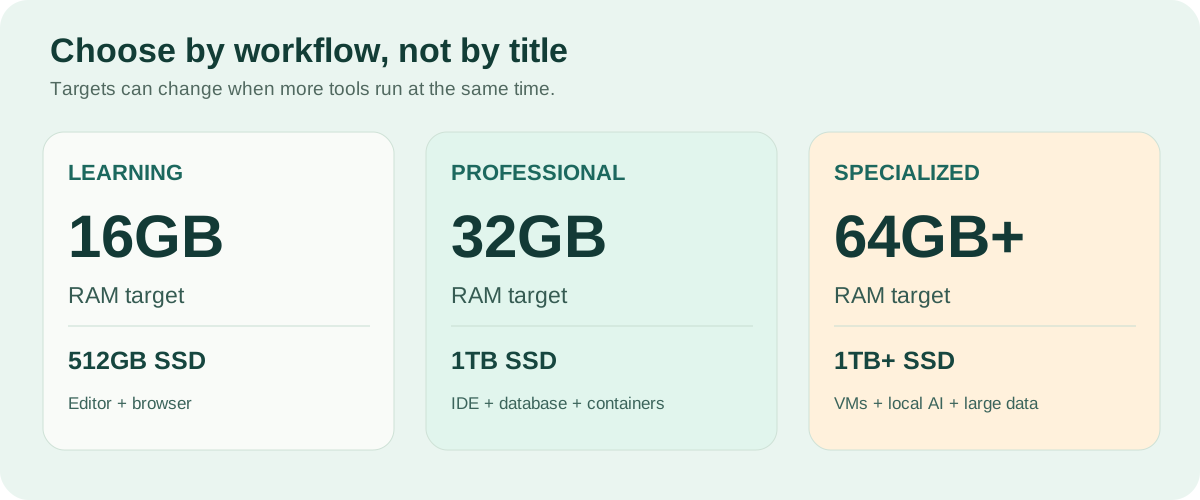
For a new all-purpose programming laptop, 16GB RAM, a 512GB SSD and a capable modern midrange processor are a sensible place to begin. If you regularly work with large IDE projects, local databases, Docker or emulators, look seriously at 32GB RAM and 1TB storage. A dedicated graphics card is optional for most ordinary web and backend programming.
| Workload | RAM | Storage | What matters most |
|---|---|---|---|
| Learning code / lightweight scripts | 8–16GB | 256–512GB SSD | Value, compatibility |
| Frontend web development | 16GB | 512GB SSD | Screen, keyboard, responsive CPU |
| Backend / Java / .NET | 16–32GB | 512GB–1TB | Memory, sustained CPU |
| Docker / emulators | 32GB preferred | 1TB preferred | RAM, storage, platform support |
| Many VMs / local AI | 32–64GB+ | 1TB+ | Memory, accelerator, workload |
The difference between what an application can run on and what makes a comfortable daily workstation is important. Visual Studio Code itself has modest requirements, for example, but the browser, local services, build tools and databases you run beside it can be far more demanding.
2. Start with your workload, not a processor sticker
Imagine three buyers. The first is learning JavaScript with an editor, a browser and one development server. The second builds APIs and regularly runs a full IDE, a local database and containers. The third uses several virtual machines to reproduce customer environments. All are programmers; their laptops should not be identical.
Write down your usual simultaneous applications, not just your main programming language. Include the browser, collaboration apps, database services, emulators, VPN software, test runners and development containers. Then identify the tasks that feel slow today: compiling, switching windows, loading projects or processing data.
Also consider whether you work mostly at a desk, on campus, while travelling or remotely against a cloud machine. A laptop that runs few tools locally might reasonably prioritize battery life and weight over maximum CPU power. Starting with these questions prevents spending on features you'll never use.
3. CPU: a higher tier isn't always better
The CPU handles a large share of compiling, testing, application execution and general responsiveness. However, labels such as Intel Core i5/i7 or AMD Ryzen 5/7 don't tell you everything. A newer midrange chip can outperform an older premium-branded one, depending on the exact architecture, thermal design and workload.
Single-core and multicore performance
Some IDE actions and smaller scripts benefit from fast individual cores. Larger builds, parallel test suites and concurrent services can benefit from multiple cores. Modern chips may mix different core types, so counting cores alone can be misleading. Compare independent results for tasks resembling yours, not just a manufacturer's headline clock speed.
Thin-and-light versus performance-focused machines
A compact laptop may prioritize low power consumption and quiet operation. A heavier model may sustain higher CPU performance for lengthy builds. This does not make thin laptops bad for coding: it simply means the right choice depends on whether your work consists of short bursts or repeated sustained computations.
Buying advice: For most web development, scripting and ordinary applications, choose a recent capable midrange processor. Pay more for higher sustained CPU performance when compiling or CPU-bound tasks frequently interrupt your day. If the system is already short on RAM, a faster CPU alone may not fix the problem.
4. RAM: 16GB versus 32GB versus 64GB
RAM is temporary working memory for the operating system and active applications. IDEs, language servers, browsers, database engines and containers all compete for it. When physical memory is tight, the operating system may rely more heavily on disk-backed virtual memory; frequent paging can make switching applications and returning to idle processes noticeably slower.
8GB: workable for lightweight learning
Students can learn HTML, CSS, Python and basic JavaScript on 8GB, especially when projects are small and few applications run simultaneously. It is less attractive as a fresh long-term purchase if you expect heavier workloads or the RAM cannot be upgraded.
16GB: the sensible starting point
16GB is practical for many frontend projects, smaller backend solutions and ordinary programming tasks. Microsoft's Visual Studio 2026 requirements recommend 16GB for typical professional solutions, while distinguishing that from both its lower installation minimum and its more ambitious best-performance specification.
32GB: a strong professional multitasking option
Now imagine a developer running Visual Studio, a sizeable solution, SQL Server, a few Docker services, an API-testing application, communication software and many browser tabs. Memory use fluctuates, and 32GB provides breathing room for these combined tools. Google's Android Studio guidance also recommends 32GB for more demanding editor-and-emulator workflows.
64GB and more: buy for demonstrated demand
Developers working with several full virtual machines, huge in-memory datasets or specialized local AI models may benefit from 64GB or more. But once your applications fit comfortably in RAM, simply doubling its capacity doesn't automatically improve build times.

Before ordering, confirm whether memory is soldered or replaceable. Some laptops cannot be upgraded after purchase. If you're choosing a non-upgradeable design, buying enough memory for likely future projects is especially important. For a deeper workload comparison, read our developer RAM guide.
5. SSD: capacity often matters more than the fastest benchmark
Solid-state drives improve startup times, file access and system responsiveness compared with traditional spinning hard disks. NVMe SSDs offer high potential throughput, but the fastest advertised sequential transfer rate isn't necessarily what your daily editing or smaller builds need.
A 256GB drive can work for simple projects and remote development; 512GB is a flexible starting point. A 1TB SSD is appealing if you keep multiple SDKs, local databases, large repositories, emulators and container images. Virtual machine disks, caches and development tools can grow significantly without much warning.
For reference, Microsoft's Visual Studio 2026 documentation lists typical installations requiring around 20–50GB of free space depending on selected components, before your projects and other tools are considered. Android virtual devices and container volumes add to that demand.
Buying advice: Prefer adequate SSD space and an upgrade path over paying a large premium for the highest sequential-speed number. Confirm whether storage is replaceable and whether the laptop has only one drive slot.
6. GPU: most coding doesn't need a dedicated graphics card
Integrated graphics are typically sufficient for HTML/CSS, web apps, scripting, databases and common backend development. A gaming-class GPU usually brings little benefit to typing code or starting ordinary API projects.
Dedicated graphics become worth evaluating when your work includes 3D game development, rendering, GPU computing, computer vision or machine learning using supported acceleration frameworks. Local AI also changes the equation: model size, quantization, memory footprint, runtime compatibility and available GPU memory can matter more than a generic GPU performance score.
Do not confuse cloud AI coding assistants with local AI inference. Cloud assistants perform most model computation remotely, so they don't inherently require a large GPU in your laptop.
Android emulator requirements also vary by platform. Google's guidance distinguishes Windows/Linux graphics recommendations from macOS recommendations. Verify the exact emulator and OS configuration before assuming integrated graphics or a dedicated GPU will be enough.
Buying advice: Skip the dedicated GPU unless your actual software makes a clear case for it. Spend the savings on sufficient RAM, storage or a better display.
7. Display: code readability is a daily productivity feature
A laptop display is something you'll look at for hours, so treat it as more than a marketing afterthought. A 13–14-inch model is convenient for travel and classes. A 15–16-inch display often feels more spacious when you're working without an external monitor.
Resolution and aspect ratio matter. A 1920 × 1200 (16:10) panel has more vertical pixels than a 1920 × 1080 (16:9) panel, allowing extra lines of code or documentation at comparable scaling. Higher resolutions can make text sharper, but interface scaling affects how much additional workspace you truly gain.
Evaluate brightness, reflections, viewing angles and text clarity. IPS can provide dependable value; OLED can offer beautiful contrast, but buyers should consider text rendering and potential long-term image retention with static interfaces. High refresh rates make scrolling smoother, but 120Hz or 144Hz isn't essential for coding.
Buying advice: For many programmers, a good 16:10 display and comfortable keyboard are more valuable than a gaming-focused screen upgrade.
8. Keyboard, battery, cooling and ports matter more than you think
Keyboard and trackpad
Code uses brackets, braces, punctuation and shortcuts constantly. Test the key layout, arrow-key arrangement, feedback and trackpad if possible. A computer can score well in benchmarks and still be uncomfortable to type on every day.
Battery life and portability
Manufacturer battery estimates are often measured under controlled workloads. Compilation, emulators and local services may draw substantially more power. Seek independent reviews of realistic use, and note whether performance drops substantially when unplugged. If you commute daily, overall weight and charger bulk matter too.
Cooling and fan noise
Two laptops with the same processor can behave differently during repeated builds. One may sustain performance better while another reduces its power target to manage heat. Read independent reviews that measure sustained speed, noise and surface temperatures—not just a quick benchmark burst.
Ports and external monitors
USB-C connectors do not all offer the same charging, display output or data features. Verify the exact laptop's USB-C, Thunderbolt/USB4, HDMI and monitor-support capabilities before purchasing a dock. Check wired Ethernet needs and any peripherals you use for hardware debugging.
9. Windows, macOS or Linux? Pick your tools first
All three are valid development environments, but they are not interchangeable for every toolchain.
Windows
Windows is especially useful for developers who require the full Visual Studio IDE, WinForms, WPF, Windows-specific enterprise software and other Microsoft desktop workloads. WSL also lets developers run many Linux-oriented tools alongside Windows applications.
Pay attention to CPU architecture: Windows on Arm supports many applications, but some workloads are unavailable or have restrictions. For example, Google's published Android Studio requirements currently state that ARM-based Windows machines are unsupported. Verify your required tools rather than assuming every Windows laptop has identical compatibility.
macOS
macOS supports numerous cross-platform programming environments, including Python, Node.js, Go, Java and modern .NET tooling. Its clearest platform-specific advantage is Xcode for Apple's development ecosystem. If you build native iPhone or macOS software, verify that a prospective Mac supports the required Xcode and macOS versions.
One important caveat for .NET developers: Visual Studio for Mac retired in August 2024. You can still use the .NET SDK and supported editors on macOS, but that isn't the same as running full Visual Studio for Windows or building every Windows desktop application locally.
Linux
Linux is well suited to backend services, containers, automation, DevOps, systems programming and server-like workflows. It offers strong command-line tools and widespread support for languages such as Python, C/C++, JavaScript, Rust and Go.
If buying a machine specifically for Linux, investigate hardware compatibility for the exact model: wireless networking, graphics, suspend/resume, firmware and peripheral drivers. Also confirm that any commercial applications required by your work have Linux support.
| Primary need | Best starting point |
|---|---|
| Windows desktop or full Visual Studio | Windows |
| Native Apple apps with Xcode | macOS |
| Linux server and DevOps workflows | Linux, or compatible cross-platform setup |
| General web and scripting | Any of the three |
Buying advice: Check operating-system and CPU-architecture compatibility before comparing tiny benchmark differences.
10. Programming laptop recommendations by specialty
Frontend and web development
For HTML, CSS, JavaScript, TypeScript, VS Code and ordinary Node-based projects, start with 16GB RAM, a 512GB SSD and a capable midrange CPU. Prioritize display and keyboard comfort. Large monorepositories and containers may justify more RAM.
Backend, Java and .NET
If you use a larger IDE, local database engines, APIs and Docker together, consider 32GB RAM and a 1TB SSD. CPU quality also matters for builds and tests. Use Windows where your required toolchain is Windows-specific; cross-platform backend work can be done on other systems.
Mobile application development
For Android Studio and emulators, 32GB is a strong target, alongside sufficient SSD capacity, CPU virtualization support and compatible graphics. For native Apple development, start with Xcode compatibility and a supported Mac; don't assume an inexpensive older Mac can install the SDKs you need.
DevOps, virtual machines and infrastructure
RAM and storage become central when running multiple virtual machines or a sizeable container environment. 32GB with 1TB storage is a useful starting point; 64GB or more may make sense for numerous simultaneous full VMs.
Data science and local AI
Small Python notebooks may run fine on general-purpose hardware, while large in-memory data or model training can require substantially more memory and compatible GPU acceleration. Calculate the requirements from your datasets, models and software libraries instead of following a one-size-fits-all specification.
11. What should you spend? Practical USD budget tiers
These are illustrative budget-planning bands, not checked live prices. Local taxes, currency conversion, refurbishing quality and retail promotions vary substantially around the world.
| Planning budget (USD) | Best fit | Prioritize |
|---|---|---|
| Under $500 | Learning, scripting, refurbished choices | Usable CPU, SSD, supported OS, 8–16GB RAM |
| $500–$800 | Everyday coding on a budget | 16GB, 512GB, screen and keyboard |
| $800–$1,200 | Balanced professional development | Strong CPU, possible 32GB/1TB configurations |
| $1,200–$1,800 | Heavy work or premium portability | Build quality, RAM, cooling, battery |
| Above $1,800 | Specialized or premium requirements | Verified GPU, memory, enterprise features |
Under $500, a well-maintained refurbished business laptop may be more useful than a flimsy new machine that cannot be upgraded. At the midrange, resist paying solely for a premium CPU badge if the trade-off is less RAM or a poor display. At the high end, focus on the actual tasks that justify the extra cost.
For someone mostly working at a fixed desk, buying a good midrange laptop plus an external monitor can sometimes improve the daily experience more than purchasing an unnecessarily expensive mobile workstation.
12. Is a used or refurbished laptop good for programming?
Absolutely, provided its condition, security support and tool compatibility are verified. Many business-class laptops offer good keyboards, solid construction and useful ports. A refurbished option can stretch a student's budget further than a comparable new entry-level machine.
Check operating-system support first. Windows 11 officially requires compatible hardware and features including TPM 2.0 and Secure Boot capability. If purchasing a Mac for Apple development, confirm that it supports the Xcode version required by your projects, not merely that it turns on and runs an older macOS release.
Next check battery condition. On Windows, powercfg /batteryreport can produce a battery report; on macOS, use its battery-health information. These are useful indicators but cannot guarantee remaining life. Test the charger, ports, speakers, webcam, Wi-Fi, keyboard, hinges and display.
Ask for SSD health information, watch for excessive temperatures and fan noise under load, and verify the machine has no firmware password or organization-management restrictions that prevent normal ownership. Factor in the possible cost of a new battery or SSD before declaring a used laptop a bargain.
Buying advice: Prefer an inspectable, well-supported refurbished machine with a legitimate seller and realistic warranty over an unusually cheap device with unclear ownership or repair history.
13. Example: compare complete laptops, not one headline number
Consider two hypothetical laptops at roughly the same price. These are teaching examples, not descriptions of products we've benchmarked.
| Specification | Laptop A | Laptop B |
|---|---|---|
| CPU | Older high-tier model | Newer capable midrange model |
| RAM | 16GB soldered | 32GB |
| SSD | 512GB | 1TB |
| Graphics | Entry-level dedicated | Integrated |
| Screen | Basic 16:9 | Good 16:10 |
For a backend developer with databases and multiple services, Laptop B could be the better fit: more memory, more local storage and a more spacious screen. But if a particular supported GPU workload requires Laptop A's graphics hardware, that changes the conclusion. Neither is automatically superior because of one component.
Now compare a light machine with excellent battery life against a heavier performance laptop. A student carrying a laptop all day may favor the first. Someone compiling large projects at a desk may favor the second. Buying decisions are contextual.
14. Where to spend extra money first
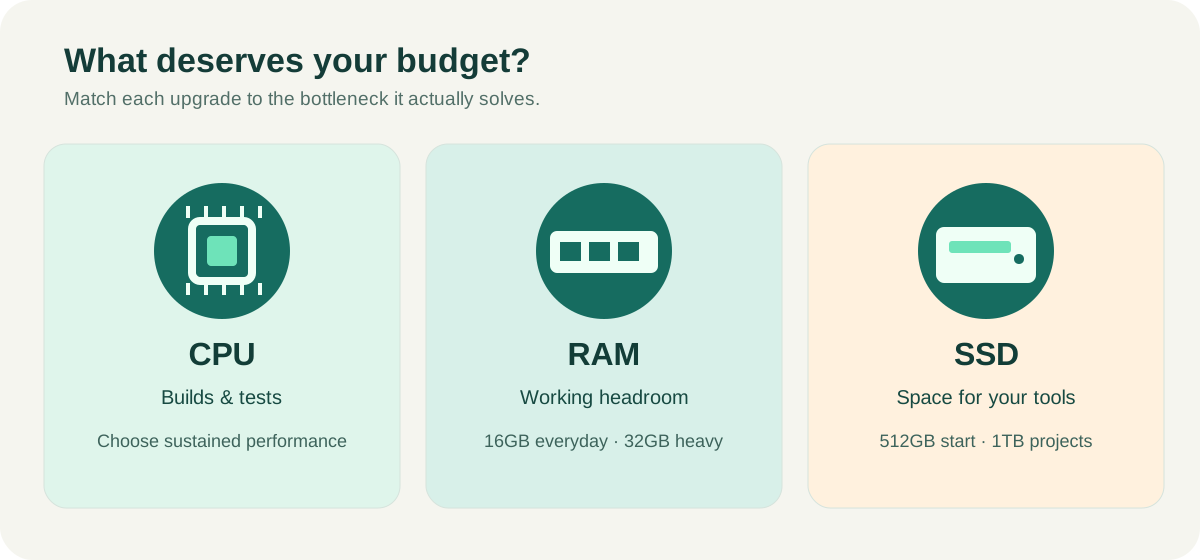
Begin with software compatibility—it's non-negotiable. Next, make sure you have enough RAM for the number of tools you run. Choose a CPU suited to your build and test workload, followed by enough SSD capacity for development environments.
After that, prioritize the components you will touch and look at every day: a comfortable keyboard and readable display. Battery, weight, fan noise and ports rise in importance based on your work location. Dedicated graphics move toward the top only for GPU-dependent development.
If you're unsure whether you need a faster processor or more RAM, first investigate whether your current machine is frequently memory-constrained or whether it waits on CPU-bound builds. An expensive upgrade is most valuable when it addresses a proven limit.
15. Final programming laptop buying checklist
- Does the operating system and CPU architecture support my required development tools?
- Have I compared exact CPU models rather than just Core i7 versus Core i5?
- Is there enough RAM for my active IDE, browsers, databases and services?
- Can memory or the SSD be upgraded later?
- Will the SSD have enough room for SDKs, repositories, images and virtual machines?
- Do I actually need a dedicated GPU for my software?
- Can I comfortably read code and type on this display and keyboard?
- Are battery life, weight and charger practical for where I work?
- Do reviews address sustained CPU performance, heat and noise?
- Have I checked external monitor support and USB-C capabilities?
- Is warranty service available in my region?
- For used hardware, have I checked battery condition, OS support and ownership restrictions?
16. Frequently asked questions
Is 16GB RAM enough for programming?
Yes for many ordinary coding tasks, including web work, scripting and smaller backend projects. If you run several heavy tools, emulators or containers at once, 32GB may offer worthwhile headroom.
Is Core i5 or Ryzen 5 enough for coding?
A capable modern model often is. Exact generation, processor design and sustained performance matter much more than a tier label alone.
Should I upgrade CPU or RAM first?
If the machine frequently runs out of memory, RAM is the more relevant upgrade. If it has sufficient memory but spends considerable time on CPU-heavy compilation or tests, investigate a faster CPU.
Do I need a gaming laptop to program?
Not usually. Gaming laptops can be powerful but may add cost, weight and fan noise. They make more sense for game development, rendering or other GPU-dependent tasks.
Do cloud AI coding assistants require a GPU?
Generally no. The model usually runs on a remote service. Running large models locally is a separate decision requiring careful attention to GPU compatibility and memory.
Can I code on a $400 laptop?
Yes, especially for beginner programming and smaller projects. A suitable refurbished laptop may offer better value than a new model with poor memory, storage or build quality.
Is 256GB SSD enough?
For lightweight coding it can be. For a new general-purpose programming laptop, 512GB is a more flexible target; 1TB is appealing for extensive local environments.
Is Windows, macOS or Linux best?
Choose according to your required tools. Windows is important for certain Microsoft desktop workloads, macOS for Xcode and Apple-platform development, and Linux for many native server and infrastructure workflows. General web development works on all three.
Final verdict: buy for the work you actually do
Most programmers don't need the most expensive laptop on the shelf. For common development workloads, a capable modern processor, 16GB RAM and a 512GB SSD make a sensible starting point. For demanding professional multitasking, 32GB and 1TB storage are upgrades worth considering. Specialized AI, GPU and virtualization work should be sized from the tools and models involved.
Don't ignore build quality, the keyboard, the screen, cooling and your required operating system. Those factors often determine whether a laptop remains pleasant to use long after its processor has stopped feeling new.
The best programming laptop is the one that lets you focus on building software—not on fighting your hardware.
Sources and further reading
Recommendations here are independent purchasing guidance. Product testing and first-hand benchmarks are not claimed. Verify software requirements again before purchasing; vendors update them over time.
- Microsoft: Visual Studio 2026 system requirements
- Microsoft: VS Code hardware requirements
- Google: Android Studio installation and hardware requirements
- Apple: Xcode versions and macOS compatibility
- Microsoft: Visual Studio for Mac retirement
- Microsoft: Windows 11 hardware requirements
- Docker: Docker Desktop for Windows requirements
Affiliate note: This article contains no paid product links. If merchant links are introduced later, eligible links must be approved and disclosed clearly.
AI-assisted, human reviewed.
This article was prepared with AI assistance and reviewed before publication. No hands-on testing is claimed. There are no active affiliate advertisements in this article.
Reviewed and approved by Syed Shuja Haider.
Read the editorial policy →